
October 19, 2026 · Michael Rodriguez
What Actually Breaks When You Build Your First AI Agent
Honest field notes on the real failure points developers hit building their first AI agent, with practical fixes for each one.
The short answer
Definition
AI Agent: An AI agent is a software loop in which a language model decides which tools to call, calls them, reads the results, and decides the next action, repeating until it reaches a stopping condition or a hard limit you set.
What makes the first agent different from a simple chatbot?
A chatbot sends one message and receives one reply. An agent runs a loop that can call external tools, branch on results, and accumulate state across multiple model calls. That loop is where almost every first-build failure lives.
The complexity jump is not gradual. Chatbots fail predictably and visibly. Agents fail silently, in ways that look like success until a downstream check catches the damage, sometimes hours later.
Why does context overflow kill agents so early?
Context overflow is the single most common silent killer. Each turn in the agent loop appends tool outputs, previous reasoning steps, and system instructions to the prompt. On a model with a 16k-token context window, a moderately verbose tool response can eat four thousand tokens in one call. Three or four tool calls later, the model starts truncating its own earlier reasoning.
Note
Fixes to keep in your build log:
- Summarize completed tool results before appending new ones
- Store long tool outputs in a scratchpad outside the prompt and pass only a pointer or a short summary
- Set a hard per-turn token budget and surface it in your logs
- Test with the longest realistic tool response you expect in production, not the short demo response

How does poor tool call error handling spiral into bigger problems?
Tool call errors spiral because the model tries to recover. When a tool returns an error, a well-prompted agent will retry, reformulate, or call a different tool. Without hard limits on retries and without structured error types, that recovery behavior becomes an expensive loop that may still return a plausible-looking wrong answer.
The model does not know that a tool failed catastrophically. It only knows what you put in the tool response. If you return a vague error string, the model invents a workaround.
Structure your tool responses so errors are unambiguous. A typed error schema, something like a status field set to "error" plus a machine-readable code, gives the agent logic a reliable branch point. Prose error messages get interpreted, not acted on correctly.
Specific patterns to log in your build notes:
- Return structured error objects, not raw exception strings
- Define a maximum retry count before the agent escalates or halts
- Log every tool call and its response status, not just final outputs
- Test with forced tool failures before you test with real tool calls
What is runaway loop logic and how do you catch it before it costs you?
Runaway loop logic happens when the agent's stopping condition is never reached. The model keeps calling tools because the task as stated is never fully satisfied, or because the completion check itself is ambiguous.
Tutorials often use a fixed step count as the loop limit. That works for demos. In production, a fixed step count either stops the agent too early on complex tasks or lets it run too long on simple ones that got stuck.
Better stopping logic uses multiple exit conditions stacked together:
- A hard maximum step count as the outer safety rail
- A semantic completion check that asks the model whether the original goal is met
- A tool-call deduplication check that halts if the same tool is called with the same arguments twice in a row
- A wall-clock timeout tied to your infrastructure budget, not just your step count
Note
What breaks in memory and state management?
State management breaks in two opposite directions. Some builders pass too much state into the prompt and hit the context problems described above. Others pass too little and the agent loses track of what it already did, repeating work or contradicting earlier decisions.
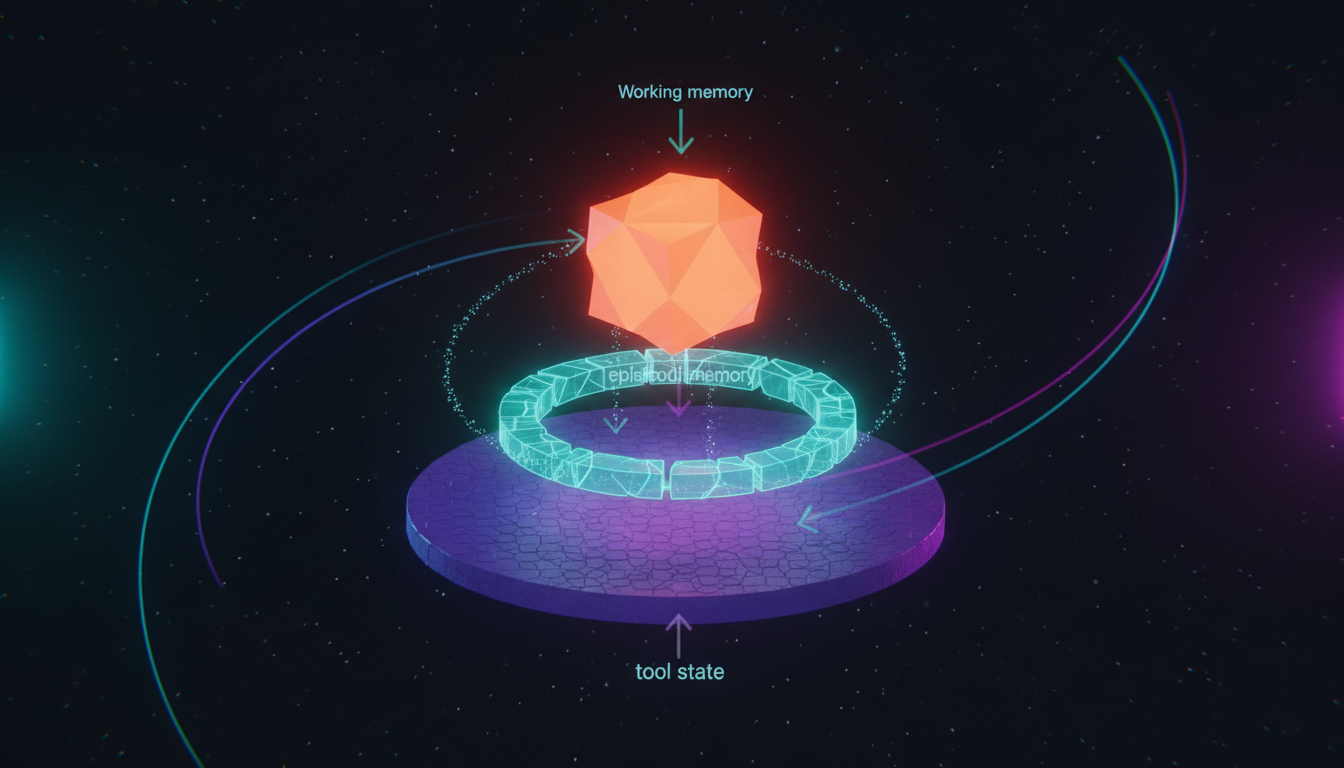
A working state pattern for a first agent keeps three things separate:
- Working memory: the current turn's inputs and the model's immediate reasoning, lives in the prompt
- Episodic memory: a log of completed steps and their outcomes, stored outside the prompt, summarized on request
- Tool state: any external data the tools read or wrote, referenced by identifier rather than pasted in full
This separation is not a performance optimization for later. It is a correctness requirement from the first working build.
Which infrastructure assumptions create surprises at scale?
First agents are usually built against a single model endpoint with fast responses and no rate limits, because that is the developer sandbox experience. Production surfaces four infrastructure gaps almost immediately.
Latency variance: A tool call that takes 200ms in testing can take 4 seconds under load. The agent loop multiplies that latency across every step.
Rate limit handling: Most model APIs return a specific HTTP status code for rate limits. If your loop does not catch that code and back off, it will hammer the endpoint and fail every call during the backoff window.
Cost accounting: Each agent run may make five to fifteen model calls depending on task complexity. Without per-run cost tracking, the first week of production use produces a billing surprise. Real published API pricing from providers like OpenAI and Anthropic is available in their documentation; use it to build a cost estimate per task type before you ship.
Observability: A chatbot has one request and one response to log. An agent run has a graph of calls, branches, and tool interactions. Standard request logging is insufficient. You need a structured trace that captures the full decision path of each run.
For a deeper look at how agents are composed into larger systems, see our overview at /10-agents, and for related build patterns, browse /blog.
What does a minimal but honest pre-ship checklist look like?
Before treating any agent as production-ready, run through these in order:
- Token count logged on every turn, hard stop at 80 percent of context window
- Tool responses return typed, machine-readable error objects
- Retry count is capped, deduplication check is active
- Stopping logic uses at least two independent exit conditions
- State is separated into working memory, episodic log, and tool state
- At least one forced-failure test run per tool before live traffic
- Per-run cost estimate calculated against published API pricing
- Structured trace logging capturing every tool call and its result
None of these require a framework or a large codebase. All of them can be added to a simple Python or TypeScript loop before it touches a real user request.
The agent patterns described here align with the architecture guidance published by Anthropic in their agent building documentation and the tool-use patterns covered in OpenAI's function calling reference. Both are worth reading alongside this field log.
Michael Rodriguez
Michael Rodriguez has spent 20 years on a dealership floor. With no tech background, he built and runs 22 production AI agents across four businesses on less than $50 a month, in evenings and lunch breaks. Agent Empire is where he ships it in public.
Building agents around a day job? Agent Empire is where operators ship it in public, together. Come build with us.